 @H5mag
Sticky content
In H5mag you can create elements that always stay visible, even after scrolling down or up. There are a few scenario's where you may want elements to always be visible to the user, for example:
- Sticky scroll down or up button.
- Menu at the top.
- Share links.
You can create a sticky element by following these steps:
- Open the H5mag editor.
- Add a new Section to the article.
- Open the section's styling settings and set Content overflow to Scroll.
- In the same styling settings, go to the Layout tab and set Width and Height to 100%.
- Place all your content in this section (also if you already had content, move it into this new section).
- To create a sticky scroll down button, place the area next/below the section that you just created. See this screenshot for clarification:
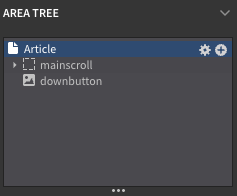
- Now position the button to where it fits your needs.
What if the above did not work?
1. The editor cannot show sticky elements, make sure to see if it works using Preview.
2. In case its also not working in Preview, please try out this article about keeping an area always visible.
Last modified: